Finale: Understanding Expression Positioning

Expression Positioning in Finale

I used Finale for years knowing that there were all sorts of options in the Expression Designer for how the Expression should get positioned, but without necessarily understanding what all the different terms meant, or how they would actually affect the resulting position of the Expression. Looking at dropdown menus like these tended to make my eyes glaze over:

I have come to appreciate the power of understanding how these settings work and setting them properly. The more things naturally pop into the places I want them to by default, the less time I spend adjusting them by hand later!

more >> “Finale: Understanding Expression Positioning”

Finale: A Simple Trick for Misbehaving Measure Number Regions

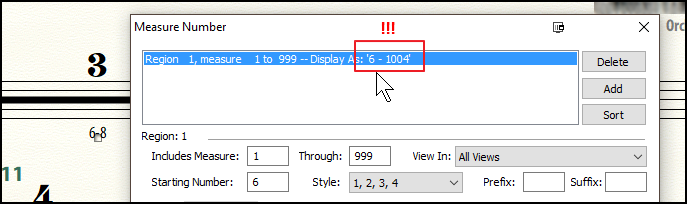
I was just working as a proofreader on a recording project, and the cue I was looking at was supposed to start with measure 6. I noticed that it was starting at measure 1, and (figuring that the copyist had simply overlooked it) went to set the Measure Number Region accordingly. I was surprised to see that the measure number region had in fact been set properly, but for some reason was not updating:

With a little bit of trial and error, I tried reselecting the numbering style, and voila! The region updated appropriately:

Usually measure number regions update dynamically as you change the “Starting Number” field, and I’m not sure why this one got stuck… But if you ever find yourself in a similar situation, give this a try!


Jacob Winkler is the Artistic Director of the Seattle Girls Choir, and an instructor in Finale and Sibelius for the Pacific Northwest Film Scoring Program. He is frequently engaged as a choral singer for film and game soundtracks, including the Halo, Assassin’s Creed, and World of Warcraft series. LinkedIn

Sibelius: Harp Pedal Diagrams Quick Tip

Harp pedal diagrams in Sibelius can be entered using several methods.  For instance, as shown in this blog post, you can manually enter a harp pedal diagram using 4 regular text characters (LMNO), then change the font to Opus Text.

There are also a growing number of harp support plugins for Sibelius to automate the process of creating harp pedaling notation (and playback), as outlined in this article by Bob Zawalich on the Sibeliusblog.

more >> “Sibelius: Harp Pedal Diagrams Quick Tip”

Finale: Tricks with “Specify Voicing” in Managed Parts

The Specify Voicing feature in Finale’s Managed Parts can be a powerful timesaver once you come to terms with its quirks and limitations.

Specify Voicing gives you options for splitting a single staff in an orchestral score into multiple parts. For example, you might put two flutes on a single staff for the score, but each player still only receives either the flute 1 or the flute 2 part. In this case, you would typically set up the Flute 1 part to display the “Top Note” of “Selected notes from one or more layers,” and layer 1 in “Measures Containing Multiple Layers.”
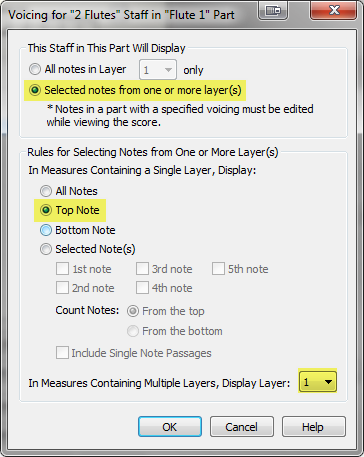
fig1_SpecifyVoicingDialog

Flute 2 would be set to display the bottom note, and layer 2 in multi-layer measures.

With these settings:

  • Any time there is a single note in a single layer (with nothing else in other layers), it will display in both parts
  • Any time there are two simultaneous notes in a single layer (with nothing else in other layers), it will put the top note in flute 1, and the bottom note in flute 2
  • Any time you have any entries in more than one layer, it will put the contents of layer 1 in flute 1, and layer 2 in flute 2

One of the problems that crops up with Specify Voicing is when you want to have some passages where both players are in unison (a2 or tutti), but other passages where only one player is playing. With the above settings, the tutti passages will display correctly, but in order to force a passage into only one part you need to specifically address the other part.

In his post titled “Hide Notes to Create Multi-Rests in Voiced Linked Parts Using a Staff Style” Robert shows how to put rests in, say, layer 2 and then use a Staff Style to have them display as blank notation so that they will be handled correctly when creating multimeasure rests. But while I love Staff Styles as much as the next guy, I do find it challenging juggling too many of them at the same, so I was wondering if there was another way to achieve the same effect…

more >> “Finale: Tricks with “Specify Voicing” in Managed Parts”